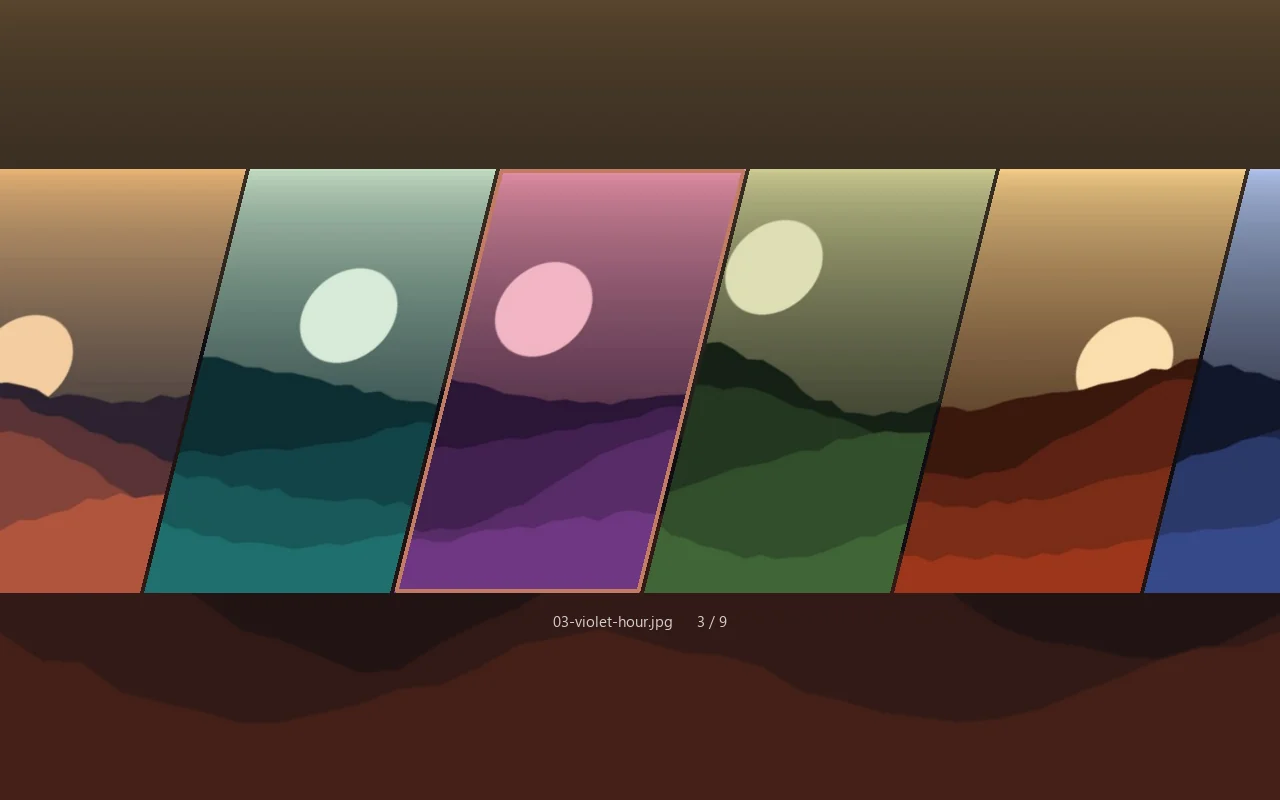
A keyboard-driven wallpaper picker for Windows. A hotkey drops a translucent strip of your wallpapers over the desktop; vim keys scroll it, Space sets one, and the app is gone.
Status
v1 built · source public · first packaged release not yet cut
The overlay: a strip of sheared wallpaper tiles over the dimmed desktop.
The idea
A wallpaper picker that is gone the moment you are done.
Most desktop tools want to live on your machine: a tray icon, a background process, a window to manage. Gladius does the opposite. It lives for a few seconds at a time. Press a hotkey, a translucent strip of your wallpapers drops over the desktop, you pick one with the keyboard, and the app exits.
It is a Windows port of hyprquickpaper, a picker for the Hyprland desktop on Linux. It keeps the original's look, keys and idea and was rewritten from scratch, so no code is shared, only behaviour.
Keyboard firstEvery action has a key. The mouse works, but it is never required.
Nothing left runningNo tray icon, no service, no startup entry. When you choose, it exits.
One file, one dependencyThe whole application is a single Python file that depends only on PySide6.
Features
What you can do with it
01
A strip of wallpapers, one hotkey away
Bind Gladius to any hotkey tool or a plain Windows shortcut and a fullscreen overlay opens over a dimmed desktop, with your wallpapers laid out as a strip of leaning tiles.
Launching it twice cannot stack two overlays.
A warm launch measured 0.30 seconds from process start to a visible window.
The overlay: a strip of sheared wallpaper tiles over the dimmed desktop.
02
Pick with the keys you already know
J and K step through wallpapers, D and U jump a screenful, Space or Enter sets one, and Esc leaves the desktop exactly as it was. Wheel, drag and click work too.
J KStep · Space sets · Esc cancels
03
Settings without leaving the overlay
Press S for a settings panel. Every change applies to the open overlay immediately and is saved for the next launch.
04
Random mode for unattended runs
A command-line flag sets a random wallpaper with no window at all, safe to run at logon or from a scheduled task.
05
Formats Windows refuses
WebP, AVIF and GIF images are converted to PNG behind the scenes, so they set like any other wallpaper.
06
Plays well with tiling window managers
Gladius floats above tiling window managers such as komorebi with no rule or config change.
Why it's different
Small on purpose.
No resident processIt starts, you choose, it exits. There is nothing in the tray and nothing to update in the background.
Three inherited bugs fixed, not portedStale thumbnails after an edit, a blank strip on first run, and same-named images in different folders overwriting each other's thumbnails.
Open sourceMIT licensed, with a packaged build and winget manifests prepared. The first tagged release has not been cut, so today it runs from source.
Build log
Built in a day, six weeks to go public
The record of how Gladius was made, from the first commit to today: the plan, the spikes, the build, the work of making it installable and the cleanup before the source went public. Dated, oldest first.
Designed and directed by Brian Gomez, built with an AI-native workflow: Brian sets the direction and makes the product, design and architecture calls; Claude Code and Codex write the code inside the rules and review gates he set. Entries marked Brian's call were his decisions; Method notes how the work was done.
One day from an approved plan to a working app that passed its acceptance run on the real machine: a design written first, two risky unknowns spiked, then the app built bottom-up one stage at a time.
A plan before any code
The first commit was a written spec, a staged build plan and the project's documentation, with no application code. Studying the original showed it was a single sheared horizontal strip, not the grid the brief had assumed. Highlighting a tile would never touch the desktop; only an explicit pick sets a wallpaper, which avoids registry churn and any restore logic.
Brian's call A faithful port of the strip over a grid that might have been more practical for a large collection. Fidelity to the original was the product; a grid was parked as a later idea.
Two unknowns spiked first
Two questions could have forced design changes, so they were tested before the build. Windows' documented backdrop API reported success but painted a flat grey panel on this kind of window, so an older undocumented call that produces real blur won, with its tint lightened so the blur stays visible. A plain tool-window flag turned out to be enough to keep the komorebi tiling manager from grabbing the overlay, so Gladius edits no other tool's config.
Method Blur was judged by measuring high-frequency detail in captured frames, not by return codes, because the losing API reports success.
Built bottom-up, one stage per commit
Config, then the folder scan and thumbnail cache, then the wallpaper setter, the command line, the strip, the overlay window and the settings panel, each in its own commit. The thumbnail cache was keyed by path, modification time and size, which fixed the original's stale-thumbnail, blank-first-run and filename-collision bugs at the root. The scroll and layout constants were carried over from the original because they are why the strip feels the same.
Method Pure logic was written test-first; the GUI stages were checked by driving the real widgets with synthetic input events.
Hardened for machines it never ran on
Because strangers would run it on other hardware and heavily customised Windows setups, a pass beyond the planned scope covered failures that would be invisible on the build machine. Thumbnail resolution now tracks the display so 4K panels stay sharp, the hand-edited config file is treated as hostile input that degrades to defaults instead of failing, and an empty wallpaper folder shows a dialog instead of a hotkey that silently does nothing. Random mode stays dialog-free so an unattended logon task can never hang on a modal box.
A wallpaper that reported success and never appeared
During acceptance, converted images set under a Microsoft Store install of Python returned success while the desktop kept the old wallpaper. Store-packaged apps have some file writes redirected into a private folder, and Windows reads the wallpaper from outside that sandbox, so the path it was given pointed at nothing. Resolving the real path before handing it to Windows fixed it, at the cost of one call.
Live acceptance under komorebi
All eight acceptance criteria passed, with the overlay summoned by the real hotkey while komorebi was running. A warm launch measured 0.30 seconds against a 1.5-second budget, and a cold run generated 72 thumbnails behind placeholders. The record states which checks were driven by synthetic events and which were done live, since synthetic input cannot prove the system delivers real keystrokes to the window.
Method Whether Windows actually took each image format was confirmed from Windows' own record of the file it last used, not the API's return value.
Era II · 20 – 21 Aug 2026
Making it installable
Later the same day, the answer to "how do I install this?" went from "clone the repo and have Python" to a packaged build, package-manager manifests and a release pipeline, while public release was held back for real-world use.
Public release gated behind living with it
With v1 complete, the planning documents were distilled into the permanent docs and deleted, each part checked to have a home first. A shakedown phase of daily use was added between acceptance and release, because a scripted run cannot judge how a wallpaper picker feels. Old commits still held machine-specific paths, so cleaning the history was recorded as a step before going public.
Brian's call Hold the repository private until real-world use had shaken out the annoyances a test run cannot reach.
A version, and an update check off the launch path
Gladius had no version string at all, so one became the single source for the command line, the build and the update check. The overlay only reads a small cached file; the network check runs after the window is up, at most once a day, and can only affect the next launch. A newer version shows as one quiet footer line naming the right upgrade command, and Gladius never updates itself.
One build for every channel
The app is packaged as a zipped folder bundle rather than a single self-extracting exe, which would unpack itself on every launch and cost seconds. The bundle started in 0.26 seconds, faster than running the script directly, and needs neither Python nor admin rights. The same zip serves winget, Scoop and a manual download, which also puts it in UniGetUI; Chocolatey was skipped for now because its per-version moderation suits a settled release, not a v1 still in testing.
Method The Scoop manifest is generated by the release pipeline from the hash of the file it just uploaded, so it cannot disagree with what people download.
An icon taken from the app
The packaged exe had a default icon and a blank Properties pane. The new icon is three tiles sheared at the same angle as the strip, the middle one selected in the default border colour, built as a real multi-size icon file, and the exe now carries product, version and licence details.
The release pipeline, proven without a release
The release workflow ran green twice on manual runs: tests, build, an exe smoke test and a 46 MB artifact matching the local build. Its actions were moved off a runtime the build servers were deprecating, so the problem would not surface on a release day. The tag-triggered half, which publishes the release and fills the Scoop bucket, cannot be rehearsed without cutting a real release and was recorded as the part to watch.
Era III · 2 Oct 2026
Going public
The deferred cleanup before the source could be opened, and where the release stands.
History scrubbed, the source made public
Every commit was rewritten to replace machine-specific paths with placeholders, and the repository was recreated so no pre-rewrite version is reachable; a secret scan over the full history came back clean. The pre-publish check had already separated the two kinds of name in the repo: the author's name on the licence and manifests is meant to be public, while machine paths had to be zero. The source went public under MIT. The first tagged release, a test on a second machine without Python and the winget submission are still ahead.