Work / Machine as Code
Machine as Code
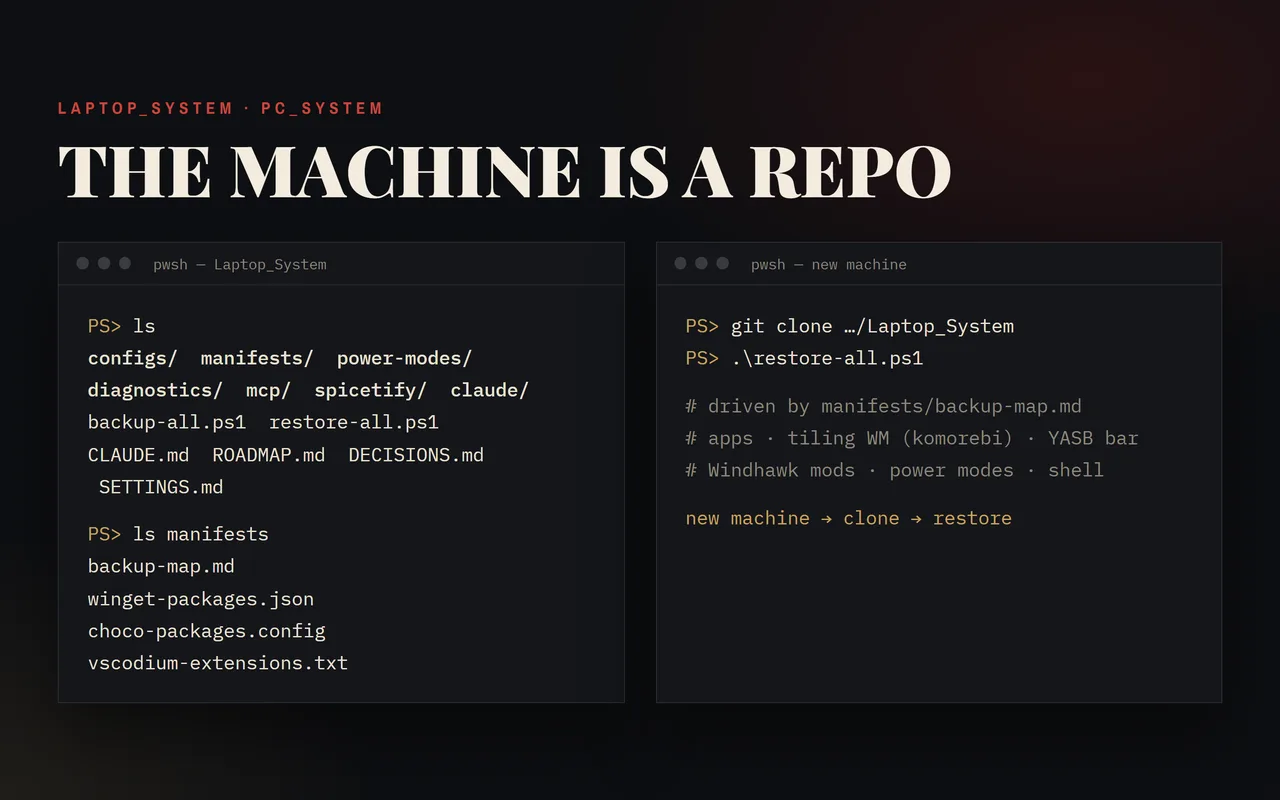
Both of Brian's Windows machines kept as repositories: the tiling desktop, the shell mods, the app manifests and a map that drives backup and restore. A new machine is a clone and a restore away.
- Status
- Live, in daily use on both machines
- Stack
- PowerShell · komorebi · Windhawk · YASB · declarative restore
- Started
- July 2026
- Source
- Private repos
What it is
A Windows desktop that has been tuned for months lives in hundreds of settings files, registry keys and scheduled tasks, and a reinstall loses all of it. Machine as Code keeps each of my two machines in its own private repository: Anvil for the laptop and Hammer for the main desktop.
Each repo holds the configuration of the tiling window manager (komorebi with its hotkey daemon and the YASB status bar), the Windhawk shell mods, the terminal and editor settings, the installed-app manifests and the scripts that put it all back. On the laptop, a single backup map lists every config-bearing app with how its settings are captured; the backup and restore scripts both read that map, so adding an app is one new row.
Restore runs in two lanes. The script lane rebuilds the same machine after a wipe. A declarative settings manifest covers moving to a different machine, where drive layouts, user accounts and locally compiled mods mean a straight copy does not work. Every entry in the decisions log records what changed, why, and what was ruled out along the way.
What it does
- Map-driven captureOn the laptop, one table lists every captured app and how: files, folders, registry keys, scheduled tasks or a command. Backup and restore both run from it.
- Safe restoreA dry-run mode, per-app restores, a snapshot of anything that would be overwritten, and a pass/fail summary that will not report success over a failed step.
- Fail-closed secret scanEvery backup checks captured files for token-shaped values and aborts on a hit before anything is committed.
- Sandbox awarenessThe scripts detect when they run inside the Claude desktop app's file-system sandbox, skip what it could fake on backup, and refuse to restore.
- Elevated desktop stackThe window manager, its hotkeys and other admin-level tools start from elevated logon tasks that are exported to the repo and re-registered on restore.
- Power modesTwo named power schemes keep the laptop awake with the lid closed, one capped for a closed bag and one at full speed for a desk, switched by double-click.
Build log
Two machines, one method
The record of how the two machine repos were built, dated and oldest first. The first era comes from the decisions ledger of the workspace that came before them; the git history starts on 21 Jul 2026.
- 96commits across the two repos
- 75days from first commit, with work on 17 of them
- 43apps captured by the backup map
- 173entries in the laptop's app inventory
As of 4 Oct 2026, counted from the repository.
- Era I · 30 Jun – 7 JulThe desktop before the repos
- Era II · 21 – 22 JulOne repo per machine
- Era III · 6 – 20 AugA living backup map
- Era IV · 26 Aug – 10 SepSilent failures
- Era V · 2 – 4 OctThe map becomes the system
Era I · 30 Jun – 7 Jul 2026
The desktop before the repos
The tiling desktop took shape on the laptop and was carried to the main desktop by hand. These entries survive as prose in the decisions log; the repository they were made in was later retired and its history reset.
-
The window manager runs elevated
komorebi could never tile admin windows, and no rule could fix it: Windows blocks a normal-user program from moving an elevated one. The window manager, its hotkey daemon and its companion now start elevated from a logon task, and the admin apps tile. The lesson recorded: when one window will not tile, compare its integrity level with the window manager's before touching any rule.
-
The terminal moves to nightly builds
WezTerm's stable channel had been frozen since early 2024, and a bug there duplicated the first keystroke in a freshly opened window, triggered by komorebi resizing it on open. The fix existed only in nightly builds, so the terminal moved to them, at the cost of package-manager updates, which cannot follow a nightly's rolling installer.
-
The AI setup gets its own repo
The engineered half of the Claude Code setup (instructions, skills, agents, hooks) became a live git repository of its own. The machine backup went data-only for it, trading a drifting copy for real history.
-
The status bar matched to the window manager
With komorebi elevated, the YASB status bar could no longer reach it, and its workspace widgets stopped updating. YASB was moved to an elevated logon task to match. The password manager was set to float rather than tile.
-
The first transfer to the main desktop
The elevated logon tasks were exported into the repo, and a runbook moved the main desktop off its old window manager onto the laptop's komorebi stack. The tiling desktop came up working, but the transfer exposed how much a straight copy assumes: different drive layout, different account, task files bound to the laptop's user. Windhawk could not be copied at all, because each mod's settings are tied to its locally compiled binary; importing them broke mod loading and was rolled back.
-
The desktop stops matching the laptop
Until a better cross-machine system existed, the main desktop was no longer kept in sync with the laptop. A local cleanup removed leftovers of uninstalled apps, and the status bar's missing icons were traced to a missing font. Two folders that measured near zero bytes turned out to hold DLLs a running app had loaded, which set the rule: check what is in use before deleting by size.
Brian's call Stop keeping the two machines in sync until a better cross-machine system existed.
Era II · 21 – 22 Jul 2026
One repo per machine
The old shared workspace was retired with a fresh history, and each machine got its own repository and its own truth.
-
Reborn as per-machine repos
The shared workspace repo was replaced by a fresh repository for the laptop, with the git history reset and the earlier changes kept as prose. One shared repo had forced every restore through a translation layer, and the machines genuinely differ in drives, accounts, hardware and apps. A declarative settings manifest was added as the cross-machine restore lane, and the scripts were hardened to fail loudly: a rejected push now stops the run instead of printing success.
Method A full live-state re-check came first. Live state wins over documented state: the docs follow the machine, never the reverse.
-
The main desktop gets its own repo
The main desktop's repo, now Hammer, was forked from the laptop's and its docs rewritten to describe the desktop. Bringing it up found that the AI setup's guard hooks had been silently dead on that machine because their paths named the laptop's user folder. The paths were made home-relative so one settings file serves both machines.
-
The desktop's first backup and health pass
The first backup on the desktop replaced the inherited laptop capture with its own. A read-only health check found the system sound and repaired the Windows component store, and leftovers of the old window manager and other removed apps were purged after each was checked. The terminal moved to nightly builds there too.
Era III · 6 – 20 Aug 2026
A living backup map
The static backup script gave way to a map that grows with the machine, while day-to-day fixes kept landing in the decisions log.
-
Local models on the desktop GPU
A local coding model was set up to run fully on the desktop's graphics card. A default context limit that had been silently truncating long prompts was found and raised, with the model still fitting on the GPU.
-
Backup redesigned around a living map
The backup was a static script that went stale as apps changed, and the one cross-machine restore had failed exactly where the docs predicted. The redesign split it into two lanes on their own schedules, the full machine backup and a fast lane for AI data, and introduced a backup map: one row per config-bearing app with its capture method and its cross-machine caveats. Retired apps' configs move to an archive folder and are never deleted.
Brian's call Defer the full sweep of every installed app to its own session.
-
Power modes for a closed lid
Windows 11's Settings app does not expose lid behaviour at all, and the laptop both hibernated on lid close and slept after 30 minutes. Two extra power schemes now keep it awake with the lid shut: Backpack Mode, with the CPU capped because a closed bag blocks the vents, and Desk Awake at full speed. The default scheme stays untouched. The scripts find schemes by name, never by ID, so they would carry to another machine unchanged.
Brian's call No hotkeys for the switches: the double-click launchers are enough, and adding binds would mean restarting the elevated window manager.
-
GIMP taught Photoshop's shortcuts
GIMP was given the PhotoGIMP layout and shortcuts by merging them into the live config by hand rather than installing the package. Its settings file was built for Linux and would have pointed GIMP at missing paths and reset the display scaling, so only the shortcuts, the tool groups and a few surgical settings were taken. GIMP joined the backup map.
-
A launcher hotkey lost at boot
Flow Launcher's Alt+Space stopped working with no error logged. Rather than hunting for an app that had stolen the combination, a throwaway process tried to register it, and succeeded: nobody owned it. The launcher had lost a race at logon, and a restart reclaimed it. A separate log flood was traced to an upstream bug and reported there instead of patched locally.
Brian's call Keep the launcher's autostart as it is and restart it if the race recurs.
-
A crash proven by switching a mod off and on
On the desktop, Settings crashed on its Background page. The crash could be reproduced by a script in about ten seconds, and turning one Windhawk styling mod off, on and off again made it vanish, return and vanish. That mod was installed with an empty config and was styling nothing, so it was disabled rather than removed. The laptop had the same mod switched off, which is why only the desktop crashed.
Brian's call Disable, not uninstall, in case the author shipped a fix. The author did, the same evening.
-
AI data moves out of the machine repos
Chat history, memory and AI tool settings moved out of both machine repos into a dedicated private data repository, with per-machine folders. The machine repos kept their history but now back up only configs and manifests, and the restore script hands the AI half to that repository's own restore.
-
A bare terminal, and a mod rejected
WezTerm lost its title bar and tab bar; under a tiling window manager each terminal is its own window. Unfocused terminals looking glitched turned out to be wallpaper showing through: Windows only blurs the active window, and the opacity was low. A Windhawk mod gave constant blur but forced the window buttons back with no setting to stop it, and the only workaround broke the terminal.
Brian's call Drop the mod for the terminal and keep the glass in the terminal's own config.
Method The wrong theories ended once the mod's installed source was read; a stale registry backup had been mistaken for live state.
Era IV · 26 Aug – 10 Sep 2026
Silent failures
A parity check between the machines and a run of diagnoses, each one a failure that reported nothing.
-
RGB lighting that never started
OpenRGB was set to start at logon with the desktop's lighting profile and did neither. Windows will not elevate a Startup-folder item, and the app needs admin rights to reach the memory modules, so it was skipped without an error; the profile argument was never passed either. It now starts from an elevated logon task with the profile, and its own autostart was switched off so a second, unelevated copy cannot appear.
Method Brian asked whether the app's own setting could do this; a test run without admin rights showed the memory modules drop out, so it could not.
-
A parity audit before the backup
Checking the desktop's repo against the laptop's found the backup map had never crossed over, and that the backup script hardcoded the laptop's user-folder location, so four backups had reported clean while skipping the desktop's shell profile. The location is now derived from Windows, with a loud failure if that fails. A retired task file that restore would have re-registered was archived. The styling mod from 15 Aug was back on after the author's fix, and the crash test came back clean.
Brian's call Audit the desktop against the laptop's repo before running the backup.
-
Logon tasks restored, tested against a foreign identity
The restore script had never read the exported task files at all. Backup now exports the tasks the repo owns from an allowlist and warns about any unlisted elevated task; restore rewrites each task's owner to the restoring machine before registering it. Because that rewrite cannot be tested on the machine that made the file, a copy was given a fake identity, restored, and registered end to end under a throwaway name.
-
A diagnosis overturned twice
A music-player theming tool had been parked on 27 Aug as waiting for an upstream fix. Re-checking proved that wrong, then disproved a second theory of a machine-level file-system fault. A process monitor showed the cause: shells launched from the Claude desktop app run inside its app sandbox, so the whole install had only ever existed in a redirected copy. It was rebuilt in the real file system from an unsandboxed scheduled task.
Method A small replica of the tool's loading loop found the silent skip; the raw paths in the process monitor ended three layers of theory.
-
A backup lane corrupting itself
The AI-data lane's sync step hid its own errors, and on every cross-machine sync a path over Windows' length limit stopped the checkout part-way, leaving thousands of files missing. Long paths were enabled, the sync's result is now checked with an automatic abort, and the damaged copy was restored after confirming nothing was lost upstream.
-
An unsolved white bar, and a catcher
A light bar appeared above the laptop's taskbar on some boots and stayed until restart. It was not identified, but four explanations were ruled out with evidence, and the bar was traced to the inside of the taskbar itself rather than a stray window. A diagnostic script now captures and measures the strip on the next occurrence, so one run settles it.
Era V · 2 – 4 Oct 2026
The map becomes the system
The deferred full sweep landed, the backup map started driving both directions, and both repos took their current names.
-
The full sweep, and an executable map
The backup script still listed 13 apps by hand on a machine with more than a hundred. A full inventory of 173 apps, runtimes and builds became the baseline for future change checks, and research per app brought the map to 43 captured apps. The map's capture column is now read by a shared module that drives both backup and restore, with a dry run and per-app restores. Configs are stored byte for byte, because a line-ending conversion would break some stores on restore.
Method Nine research lanes ran in parallel. A pilot lane on a smaller model invented a registry location and marked it confirmed, so every location claim had to come from a command actually run, and the lanes moved to a stronger model.
-
Sandbox-aware by design
The 29 Aug finding became a rule in the scripts. Backup detects when it runs under the Claude desktop app, skips the settings the sandbox could fake and names them; restore refuses to run there. A sandboxed run and an unsandboxed run were compared file by file, and matched everywhere except exactly the skipped settings.
-
Secrets caught before they were pushed
During the sweep, research agents printed some secret values into their own transcripts, which the AI-data lane mirrors to a private repository. They were found and redacted before any backup ran, and the most sensitive of them, a private key, was rotated. The lane now also checks every staged file against the values in the machine's known secret files and aborts on a match. Briefs that touch secret-bearing files now carry a names-only rule from the first dispatch.
-
Laptop_System becomes Anvil
The laptop's repo was renamed Anvil: folder, GitHub repository and docs, with dated history entries keeping the old name. The rename also moved the 46 chat sessions and their settings tied to the old folder path, which a stock move would have dropped, and was checked afterwards against the sidebar, the configs and the disk.
-
PC_System becomes Hammer
The main desktop's repo was renamed Hammer, matching the laptop's Anvil two days earlier.
Brian's call The rename, so both machine repos share a naming scheme.